Environmental equipment, instruments and meters, robots, ...

Instrument Power On/Off
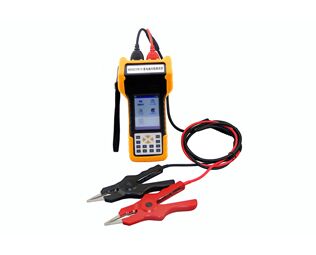
The battery capacity tester features a power switch on the left side, flipping it up to power on and down to power off. Power-on main interface:
Instrument startup interface
Battery Capacity Tester Interface Displayed Upon Power-On:
Main Menu
Battery Capacity Tester: Tap the screen to access the main menu, as shown in the image below:
Instrument Main Menu Interface
The letter "U" indicates that the instrument is currently properly connected to a USB drive; clicking on the icon in the upper left corner will save the current screen of the instrument to the USB drive.
Single Battery Measurement
The battery capacity tester allows for individual cell measurement by simply clicking on the "Single Cell Measurement" option. After inputting parameters such as the voltage type, battery type, and battery serial number, simply tap the "Start Measurement" button on the touch screen to initiate the measurement.
Grouped Battery Measurement
The battery capacity tester's measurement interface is as follows, with the same measurement operation as for single battery measurements. After entering the parameters of input voltage type, battery type, station number, group number, and battery count, simply click the "Start Measurement" button on the touch screen to initiate the measurement.
Oscilloscope Features
Double-click the "Oscilloscope" menu item on the main interface of the battery capacity tester to enter the oscilloscope function interface, as shown below. The oscilloscope function allows for simple voltage measurements.
Data Management Feature
Double-click the "Data Management" menu item on the main interface of the battery capacity tester to access the data management feature. This includes single battery measurement data and grouped battery measurement data, allowing for operations such as opening and replaying data records, transferring to a USB drive, and deleting them. Additionally, you can format the data records.
System Management
The battery capacity tester system management interface is as follows, including features such as time settings, parameter calibration, system updates, language selection, and version information.


www.114global.com © Zhongshang 114 Hebei Network Technology Co., Ltd.Address: Room 6009, Oriental New World Center, No.118 East Zhongshan Road, Qiaoxi District, Shijiazhuang City, Hebei ProvincePlatform Service Hotline: 4006299930