











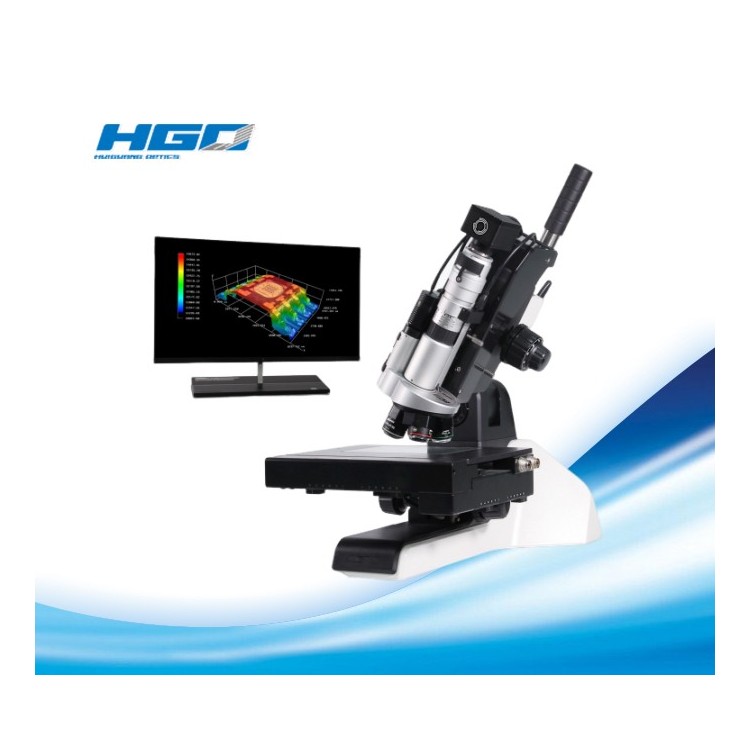


Olympus Semiconductor/FPD inspection microscopes feature ergonomic and user-friendly designs that enhance throughput while keeping inspectors comfortable as they perform their work.
Olympus Semiconductor/FPD inspection microscopes MX63 and MX63L are optimized for high-quality inspection of wafers up to 300mm, flat panels, circuit boards, and other large chip samples. Their modular design allows you to select the components needed to customize the system to your application. Olympus Semiconductor/FPD inspection microscopes, combined with Olympus Stream Image Analysis software, simplify your entire workflow from observation to report creation.
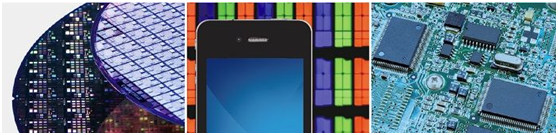
Advanced analytical tools
The MX63 series offers versatile observation capabilities with clear, crisp images, enabling users to reliably detect defects in samples. The new lighting technology and image capture options in the Olympus Flow Image Analysis software provide users with more choices to evaluate their samples and record their findings.
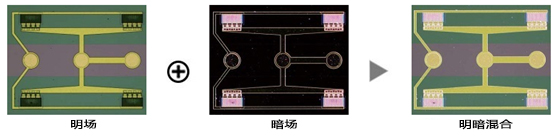
Invisible Made Visible: Blending Observation and Acquisition
Mixed observation technology, by combining darkfield with another observation method (such as brightfield, fluorescence, or polarization), produces unique observation images. Mixed observation allows users to view defects that conventional microscopes struggle to see. The circular LED illuminator for darkfield observation features a directional darkfield function, illuminating only one quadrant at a time. This reduces the halo effect on the sample and aids in visualizing the surface texture.
Structure of semiconductor wafer
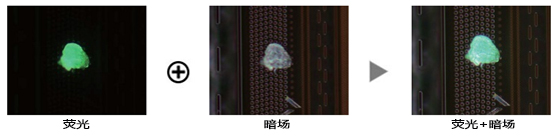
Residual photoresist on semiconductor wafers
Create Panoramic Images Easily: Instant Mia
Using Multiple Image Alignment (MIA), users can easily and quickly stitch images by simply moving the KY knob during the manual stage, eliminating the need for an electric platform. Olympus Flow software generates panoramic images through pattern recognition, providing users with a broader view.
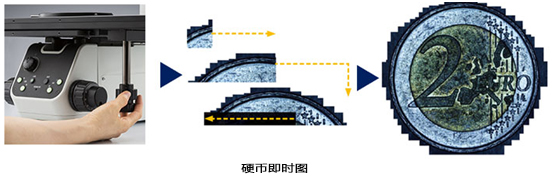
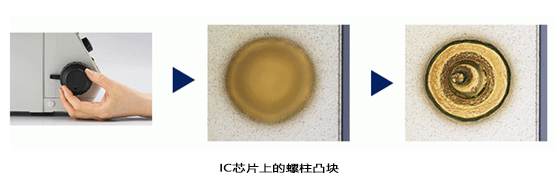
Create all focal images: EFI
The Extended Focus Imaging (EFI) function in the Olympus stream captures images of the sample, which are highly extended beyond the depth of field and overlaid to create a fully focused image. EFI can be executed manually or electrically on the Z-axis, creating a height map for easy structural visualization. EFI images can also be built offline within the stream desktop.
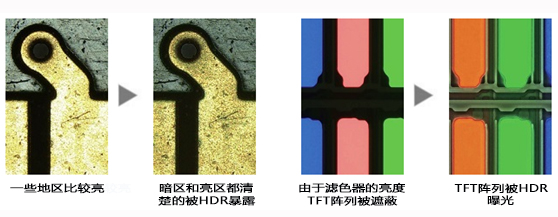
Capture bright and dark areas with HDR
Utilizing advanced image processing, HDR (High Dynamic Range) adjusts the brightness differences in images to reduce glare. HDR enhances the visual quality of digital images, thereby assisting in generating professional reports.
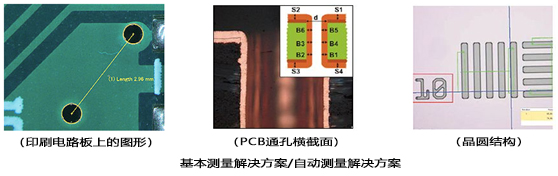
From basic measurements to analysis
Measurement is crucial for quality control and process inspection. Taking this into account, even the entry-level Olympus Stream software package includes a full interactive measurement feature menu, with all measurement results saved in image files for further documentation. Additionally, the Olympus Stream material solutions offer an intuitive, workflow-oriented interface for complex image analysis. With a single click, image analysis tasks can be executed quickly and accurately. As the processing time for repetitive tasks significantly decreases, operators can focus on the checks at hand.
Report Generation
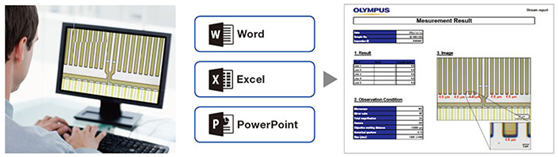
Creating reports usually takes longer than capturing images and measurements. Olympus Stream software offers intuitive report creation, allowing for the repeated generation of intelligent and complex reports based on predefined templates. Editing is straightforward, and reports can be exported to Microsoft Word or PowerPoint software. Additionally, the report feature of Olympus Stream software enables digital zooming and image enlargement. Report files are a reasonable size, making data exchange via email convenient.
Independent Camera Options
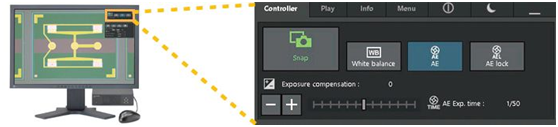
Utilizing the DP22 or DP27 microscope camera, the MX63 series becomes an advanced standalone system. The camera can be controlled through a compact box requiring minimal space, helping users maximize their lab space while also capturing clear images and conducting basic measurements.
Designs that support Cleanroom Compliance
The MX63 series is designed in a cleanroom environment, aiding in reducing the risk of contamination or damage to samples. The system features ergonomic design for user comfort, even during extended use. The MX63 series complies with international standards and specifications, including half S2/S8, CE, and UL.
Optional Chip Loader Integration - AL120 System*
Optional wafer loaders can be connected to the MX63 series, transferring silicon and compound semiconductor wafers from tape boxes to the microscope stage without using tweezers or rods. Excellent performance and reliability enable effective front and back macro inspections, while the loader helps enhance productivity in the lab.
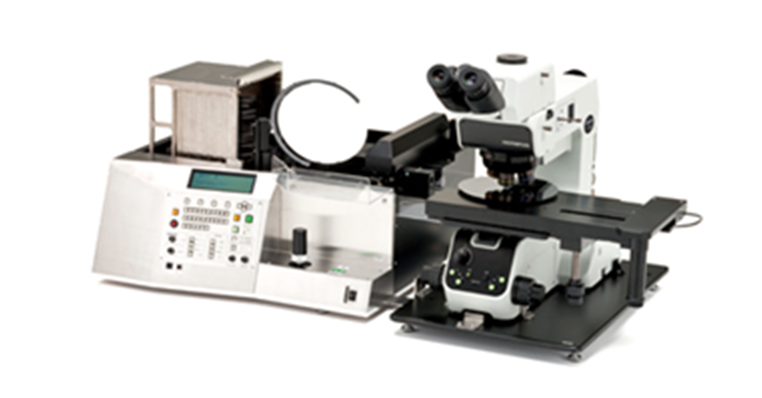
MX63 combined with Al120 chip loader (200mm version) *E120 is not available in EMEA.
Rapid Cleaning Inspection
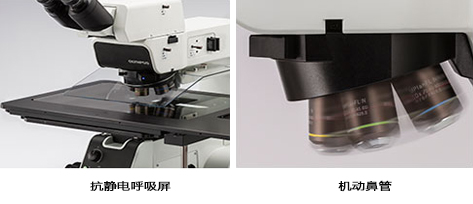
The MX63 series meets cleanroom semiconductor inspection requirements. All moving parts are designed with shielding structures, and antistatic treatment is applied to components such as the microscope stand, tubes, and respirator masks. The rotating speed of the adjustable nose flaps is faster than that of the manual ones, reducing inspection time while keeping the operator's hands below the wafer, minimizing potential contamination.
System design for effective observation
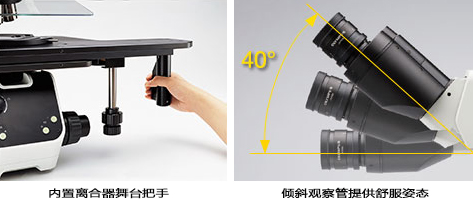
Due to the combination of an internal clutch and the XY dial, the XY level can perform both coarse and fine stages of motion simultaneously. This stage aids in observing efficiency, even for large samples such as 300mm wafers. The wide range of the tilting observation tube allows the operator to sit comfortably under the microscope.
Accept all chip sizes
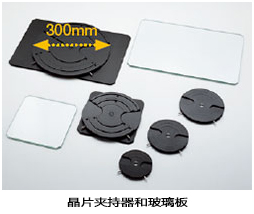
The system is compatible with various types of wafer holders and glass plates in sizes of 150-200mm and 200-300mm. If the wafer size changes on the production line, the microscope frame can be modified at a lower cost. With the MX63 series, different stages can be used to accommodate check lines on 75mm, 100mm, 125mm, and 150mm wafers.
Intuitive Microscope Control: Comfortable and Easy to Use
The microscope's setup is straightforward, allowing users to easily adjust and replicate system settings.
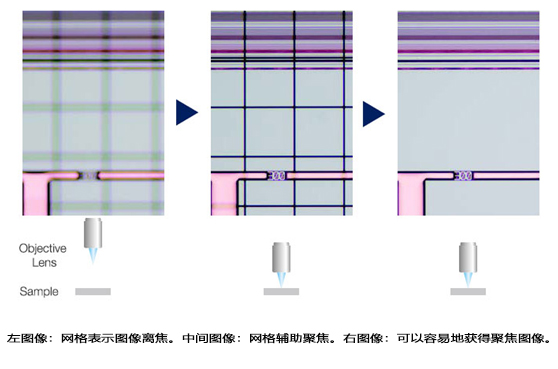
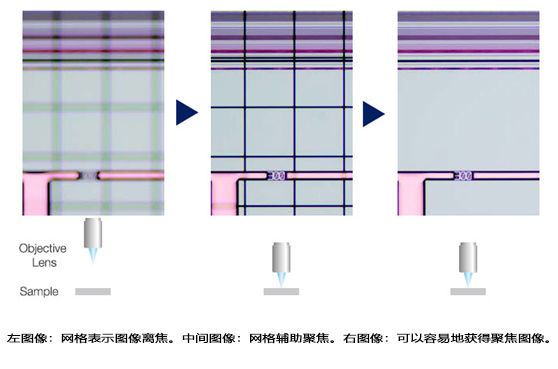
Quickly Find the Focus: Focus Aid
Inserting focusing auxiliary devices in the optical path allows for easy and accurate focusing on low-contrast samples, such as wafer.
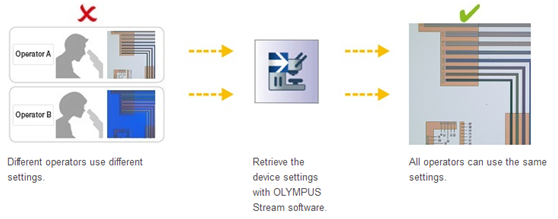
Easily Restore Microscope Settings: Encoded Hardware
The coding function combines the hardware settings of the MX63 series with Olympus' flow image analysis software. Observation methods, lighting intensity, and magnification are automatically recorded and stored in the corresponding images by the software. Due to the ease of reproducing the settings, any operator can perform the same quality checks with minimal training.
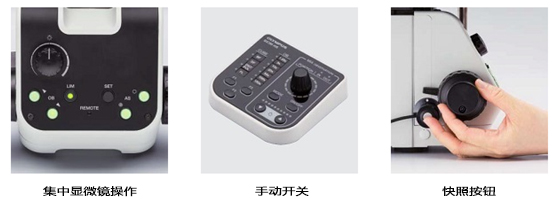
Ergonomic controls for faster, more comfortable operation
The control device for changing objectives and adjusting the iris is located beneath the microscope, thus users do not need to release the focusing knob or remove their head from the eyepiece during operation.
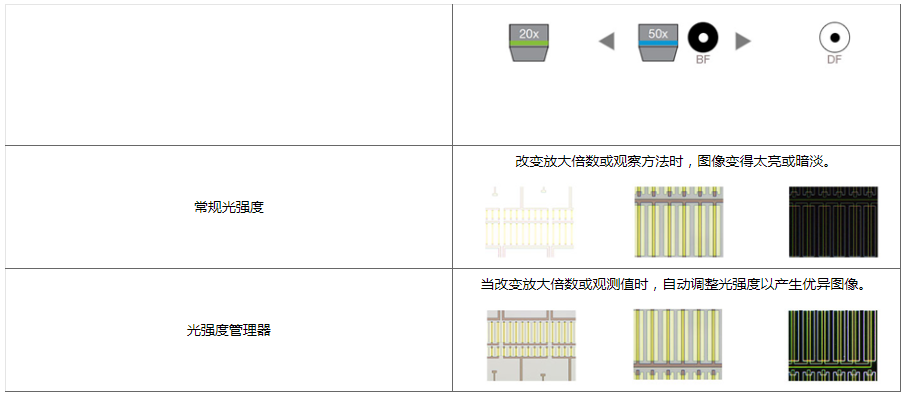
Observation at an accelerated pace through light intensity manager and automatic aperture control
Under normal microscope conditions, each observer needs to adjust the light intensity and aperture. The MX63 series allows users to set light intensity and aperture conditions for different magnifications and observation methods. These settings can be easily recalled, helping users save time and maintain excellent image quality.
Light Intensity Manager
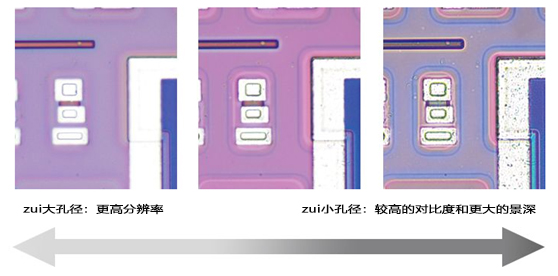
Automatic Aperture Control
Optical and digital imaging quality inspection
Olympus' history of developing high-quality optics and advanced digital imaging capabilities has proven its record of providing excellent measurement accuracy in optical quality and microscopes.
Optical Performance: Wavefront Aberration Control
The optical performance of the objective lens directly affects the quality of the observed image and the analysis results. The Olympus UIS2 high-magnification objective design is engineered to minimize wavefront aberration, providing reliable optical performance.
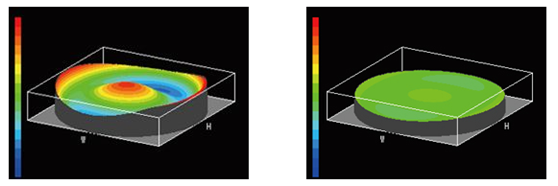
Bad Wavefront / Good Wavefront (UIS2 Target)
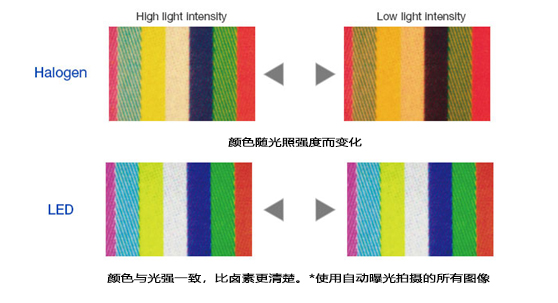
Consistent Color Temperature: High Intensity White Light LED Lighting
The MX63 series utilizes high-intensity white LED light sources for reflective and transmissive illumination. The LEDs maintain consistent color temperature regardless of intensity, ensuring reliable image quality and color reproduction. The LED system offers efficient, long-lasting lighting materials suitable for material science applications.
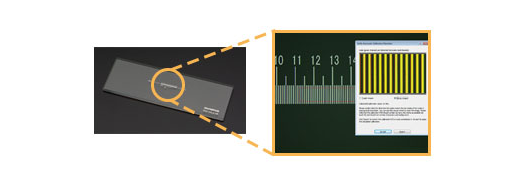
Accurate Measurement: Automatic Calibration
Similar to a digital microscope, automatic calibration is available when using Olympus Flow software. Automatic calibration helps eliminate human variability during the calibration process, resulting in more reliable measurements. The automatic calibration uses an algorithm to automatically calculate the correct calibration by taking the average of multiple measurement points. This maximally reduces the differences introduced by different operators, maintains consistent accuracy, and enhances the reliability of regular verification.
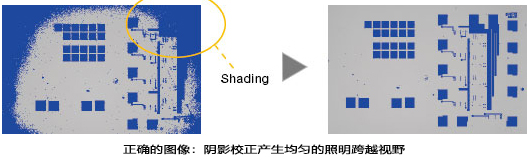
Completely clear imagery: Image shadow correction
Olympus Flow Software features shadow correction to accommodate shadows at the image corners. When used in conjunction with intensity threshold settings, shadow correction provides more accurate analysis.
Semiconductor Wafer (Binarized Image)
Fully customizable
The MX63 series is designed to allow customers to select a variety of optical components to meet individual inspection and application requirements. The system can utilize all observation methods. Users can also choose from various Olympus flow image analysis software packages to satisfy their personal image acquisition and analysis needs.
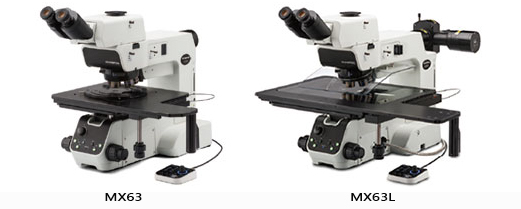
Two systems accommodate different sample sizes.
The MX63 system accommodates wafers up to 200mm, while the MX63L system handles wafers up to 300mm with the same small footprint as the MX63. Modular design allows for customization of the microscope to your specific requirements.
Infrared compatibility
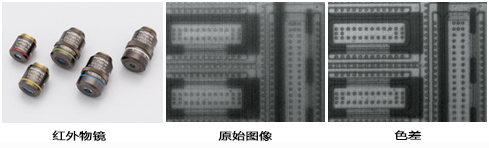
Infrared objectives can be utilized to inspect the internal components of IC chips封装 and mounted on PCBs without damage, leveraging the silicon's transmission characteristics of infrared light. Color correction for infrared targets from 5X to 100X can be achieved through near-infrared visible light wavelengths.
MX63 series for reflective light microscopes applications. These applications are examples of some methods used in the system for industrial inspection.
Infrared (IR) is used to locate other defects on IC chips and silicon devices on glass.
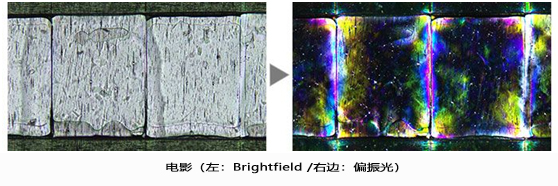
Polarized light is used to reveal the texture and crystal state of materials. It is suitable for inspecting wafers and LCD structures.
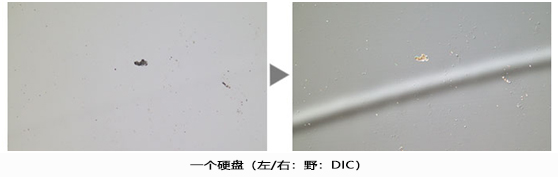
DIC (Differential Interference Contrast) is used to help distinguish differences between views and small samples. It is ideal for university inspections of samples with high variability, such as minute magnetic heads, hard disk media, and polished wafers.
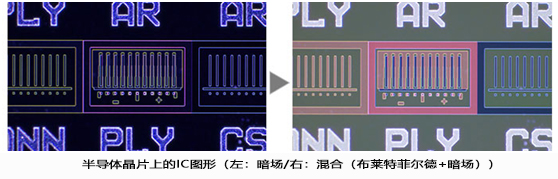
The dark field is used to detect minor scratches or defects on samples, or to inspect samples with a mirror-like surface (such as a wafer). Mixed lighting allows users to view patterns and colors.
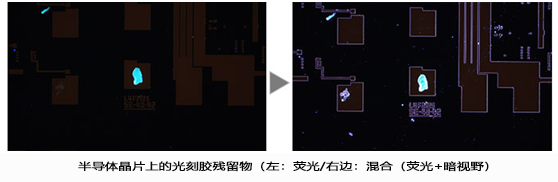
Fluorescent samples are used when illuminated by specially designed filters. This is for detecting contamination and residual photoresist. Mixed lighting allows for observation of photoresist residuals and IC patterns.
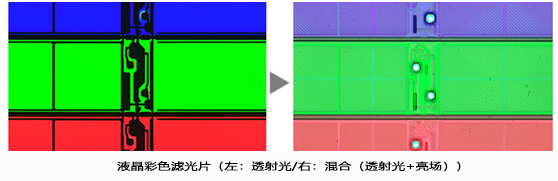
This observation technique is suitable for transparent samples, such as LCDs, plastics, and glass materials. Mixed lighting allows for the observation of filter colors and circuit patterns.
Olympus Semiconductor/FPD Inspection Microscope Solution MX63 / MX63L Configuration Parameters
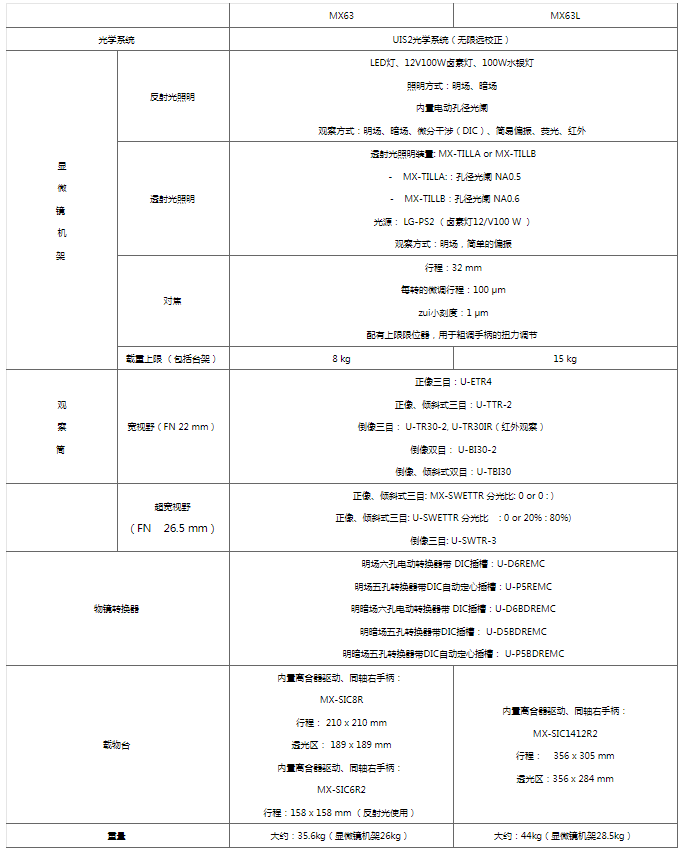
Note: The parameter table contains an introduction to the main parameters, which can be configured according to specific requirements.